
Tag: JavaScript

IntersectionObserver for a single DOM node

Never write code like:

new IntersectionObserver((entries) => {
  const entry = entries[0];

… even if you only care about a single node. Why? Because, it turned out, sometimes browsers queue multiple events (for the same DOM node) and invoke the callback with multiple entries. Only the last item has a non-stale data inside. So the correct approach is:

new IntersectionObserver((entries) => {
  const entry = entries.at(-1);
Parametrized var-functions

type Fn = <T>(a: T) => T;
declare const fn: Fn;

const a = fn<number>; // no "()"
a; // const a: (a: number) => number

It was on the surface all along, but it eluded me.

TIL: HTMLCollection is alive

TIL: HTMLCollections are live-collections. What does it mean? Look. Imagine you have HTML like this:

<div>
  <br/>
  <br/>
</div>

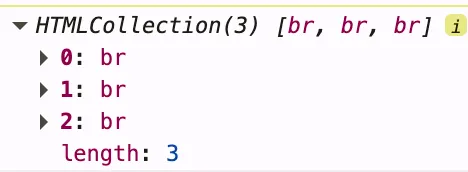
Then you want to find all its <br/>s:

const collection  = $0.getElementsByTagName('br');

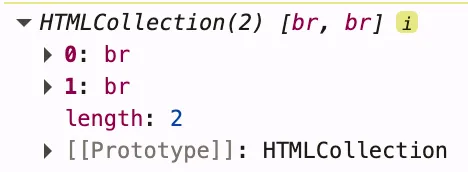
Thus far, everything is obvious, right? Ok, let’s add one more <br/>:

$0.append(document.createElement('br'));

So, now have three of them. Let’s read the same collection element again:

Whoa… It was updated too. Why? HTMLCollection is a “live” collection:

An HTMLCollection in the HTML DOM is live; it is automatically updated when the underlying document is changed. For this reason it is a good idea to make a copy (e.g., using Array.from) to iterate over if adding, moving, or removing nodes.

Evict password managers

There are multiple password managers like 1pass, KeePass, and LastPass. Most of them have browser extensions. They are great. But they alter the page behavior, including HTML. Sometimes we need to prevent them from doing that.

Many years ago, people just did this:

<input autocomplete="off"

Now it doesn’t work. These extensions don’t respect this attribute. You might have seen this one:

<input data-lpignore="true"

It doesn’t work either (at least not with KeePass)

I came up with a simple and pretty silly solution:

<input type="text" onfocus="event.target.type='password'"

And it works ;-) The extensions don’t care about text-inputs. And they are not smart enough to detect new controls. At least for now.

upd: It helped with KeePass, but didn’t work out with 1Password.

"Native code" label

How to detect if a function is a core part of browser API? This way:

  const a = () => {};
  a.toString(); // () => {}
  console.log.toString(); // function log() { [native code] }

You see? [native code] label. Sounds good, right?

  const a = () => {};
  const b = a.bind(null);
  b.toString(); // function () { [native code] }

Oops. But we still have this log name in the string snapshot.